Photo Recover Pro-Recover File
- 4.6
- Rating
- 100.00K
- Installs
- Free
- Price

 Analysis by App-foxy
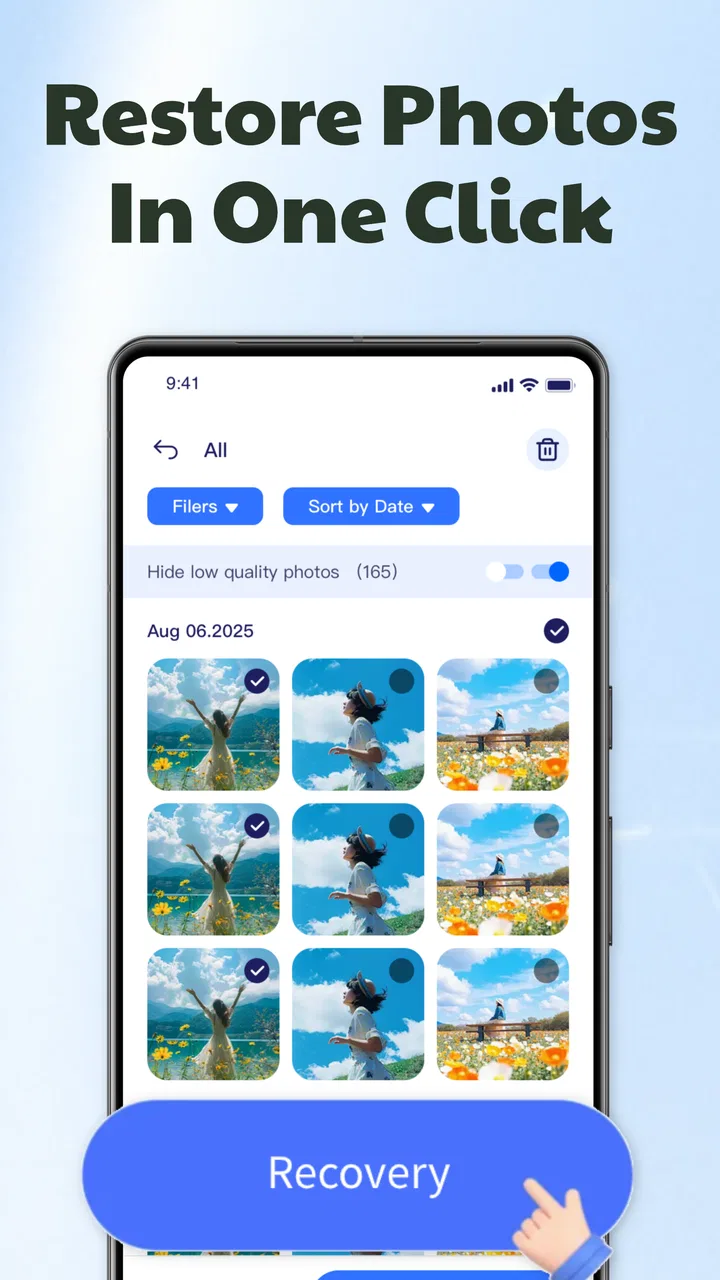
When a photo disappears from a shared phone, the problem is rarely just technical. It may be a child’s school picture, a family video, a document photographed for later, or an image another person still needs. I tested Photo Recover Pro-Recover File with that everyday situation in mind, and I found a focused productivity app rather than a general file manager. Its purpose is simple: look for recoverable photos, videos, and documents, let you preview what it finds, and help you restore selected items.
That narrow purpose is its main appeal. I would not install it expecting a complete household backup system or a replacement for careful storage habits. I would use it when an important file has vanished and I want a direct recovery attempt before giving up. The app is free, aimed at everyone, and developed by yaohuo. It has reached over 100 thousand installs and holds a 4.6 average from around 2.8 thousand ratings, which suggests that many people find the basic idea useful.
How it fits a shared household phone
I’d treat a shared phone recovery as a small household process, not a race to tap every result. In this section, I’ll look at how to agree on who is operating the device, whose missing files are in scope, and how to keep a useful recovery attempt from becoming an unnecessary peek at everyone’s material.
You May Also Like

 Blood Strike: 2.5 Anniversary
Blood Strike’s Loadouts Turn Every Drop Into a Tactical Gamble
A close look at Blood Strike’s custom loadouts: how fast access to signature weapons reshapes its battle royale rhythm, rewards preparation, and narrows the gap between fights.

 Pandora - Music & Podcasts
Pandora’s Music Is Easy to Start, but Harder to Recover
Pandora’s strength is its low-effort path from a seed to a station. Its weak spot is how much confidence it asks you to place in connection, setup, and quiet recovery.

 8 Ball Pool
 Is Built on Rivalries, Rematches, and Routine
A close look at the rivalries, rematches, shared routines, and unanswered safety questions that turn a quick pool match into a persistent mobile community.

 Samsung Music
’s Quiet Strength Is Playing What You Already Own
Its reach comes less from spectacle than from dependable access to a personal library. That simplicity is both the app’s strongest retention engine and its ceiling.

 AccuWeather: Weather Radar
AccuWeather Review: A Quick, Clear Forecast for Everyday Decisions
For everyday plans, the best forecast is the one you can understand quickly. AccuWeather makes rain timing, radar, and local conditions easy to act on, with a few trade-offs.

 Hill Climb Racing
Why Hill Climb Racing Still Turns Crashes Into One More Run
A tiny car, a bumpy hill and one more upgrade: Hill Climb Racing keeps resurfacing because its simple chaos makes every near-miss feel personal.
More From Our News Desk
View All News


A practical rescue tool after an accidental deletion
The most convincing use case is a shared Android device where several people handle the same gallery. Imagine one person clearing storage, another taking pictures, and a child borrowing the phone for a school project. A swipe in the wrong place can remove an image that somebody else considers important. In that moment, Photo Recover Pro-Recover File gives the household a single place to begin looking instead of forcing everyone to search through unrelated file folders.
I like the preview step because recovery should not mean restoring everything blindly. When a scan produces many results, previewing the candidates first helps separate a needed picture from an old thumbnail, duplicate-looking item, or file nobody recognizes. That matters even more on a shared device, where restoring a large batch can make the gallery harder to organize and may bring back material that another user intentionally removed.
The same approach works for short videos and photographed documents. A family member may delete a scanned receipt, a homework page, or a clip recorded during a gathering without realizing that someone else still needs it. The app’s stated support for photos, videos, and documents makes it more useful than a tool limited to pictures alone, although I would still treat every recovery as an attempt rather than a guarantee.
What I would do before pressing restore
My first step would be to ask who owns the missing file and whether anyone else has already tried another recovery method. On a shared phone, two people can easily work against each other: one person scans while another clears storage, moves files, or installs a different utility. A short conversation avoids confusion and protects the person who actually needs the file.
I would then preview the results carefully and restore only the items that can be identified. This is one of the more useful habits with a recovery app: selection is not just about saving space. It preserves the household’s existing gallery structure and reduces the chance of mixing personal images with someone else’s files.
After recovery, I would rename or move the restored document or video immediately if the app or the phone’s file tools allow that next step. Recovery is only half the job. A file with an unclear name sitting among dozens of images is still easy to lose again, particularly when several people use the same handset.
Why shared use changes the decision
On a personal phone, I can make recovery decisions without explaining them. On a household device, the social side matters. A parent may be restoring a child’s schoolwork, while an adult may be trying to recover a private document. The app does not turn the phone into separate personal spaces, so the people using it need to agree on what is being scanned, what is restored, and where the recovered items will remain.
That boundary is important because a recovery screen can bring files into view that were not part of the original request. I would avoid handing the phone to a young child and asking them to choose results alone. Even with an Everyone content rating, the context of recovered files can be personal, and age suitability is not the same thing as privacy awareness.
Setup boundaries I would establish first
The app runs on Android and requires version 8.0 or later. That makes it suitable for many older devices still used around a home, but it is worth checking the phone’s Android version before planning a recovery session. If the shared handset is older than that requirement, this particular tool will not be the answer, and delaying the search while arranging another device could reduce the chance of finding anything useful.
I would also decide whose account and device are involved before installing it. A recovery app on a family phone should not automatically become a reason to scan every person’s material. If the phone belongs to one adult but is regularly borrowed by others, the owner should lead the process. If it is a jointly used tablet or spare phone, everyone who may be affected should understand what is happening.
The current version is 1.1.4, and the app was released on September 2, 2025. I see those details as useful context rather than a promise of a particular result. Recovery performance depends on the device and on what happened after deletion. The longer a phone continues to create and move files, the more complicated any recovery attempt can become, so I would avoid filling the device with new downloads while deciding what to do.
Keeping the recovery session controlled
A good household workflow is surprisingly simple. Stop unnecessary activity on the phone, identify the missing item, scan once, preview the candidates, and restore only what the owner recognizes. I would not let several family members repeatedly start scans just to see what appears. That creates noise and makes it harder to tell which result belongs to which request.
I would also keep the phone in the hands of one responsible person during the session. Shared devices often have mixed notifications, open galleries, and multiple users waiting nearby. A controlled process reduces accidental sharing and makes it easier to notice whether the restored file has returned to the place expected.
Another useful boundary is to separate recovery from cleanup. I would not combine a scan with a rushed storage-clearing session. First recover and verify the important items; only afterward decide whether duplicates, temporary files, or unwanted media should be removed. Treating those as separate tasks lowers the risk of deleting the same material twice.
Coordination, trust, and the limits of a simple recovery app
A simple recovery tool can help with a lost file, but it cannot settle questions about ownership or privacy for the people sharing the phone. I’ll focus here on the practical limits of that trust: when a joint recovery session makes sense, when it may feel intrusive, and why a clear backup arrangement is still the safer foundation.
Who should use it in a family?
For adults and older teenagers who understand the difference between previewing and restoring, the workflow should be easy to follow. A younger child can explain what is missing, but I would have an adult operate the scan and review the results. The Everyone rating tells me the app is broadly suitable from a content-classification perspective; it does not mean every recovered file will be appropriate for every person looking at the screen.
This distinction is especially relevant when a phone contains work documents, identity-related images, medical paperwork, or private conversations saved as screenshots. A family member asking for one missing picture may not need to see every other result. I would keep the owner present and avoid turning a recovery request into an informal tour of the device’s deleted material.
Trust also affects whether the app is the right choice. If the phone is used by several adults who do not want their files exposed to one another, a shared recovery session may be uncomfortable even when the technical goal is legitimate. In that situation, a device-level backup or a separate personal account may be a better long-term arrangement than relying on one recovery utility after something goes wrong.
Where it differs from the usual alternatives
The first alternative is the phone’s own trash or recently deleted area. That option is usually the least disruptive because it follows the device’s normal gallery workflow and often preserves familiar folders. I would check it before opening a recovery app. Photo Recover Pro-Recover File becomes more interesting when the usual gallery route does not show what I need, or when I want a broader scan across supported file types.
Cloud backup is a different kind of solution. It is better for preventing loss because it keeps another copy before deletion happens, but it depends on an account, synchronization, available storage, and the backup having actually completed. A recovery app is more immediate after an accident, yet it cannot replace a dependable second copy. For irreplaceable family photos, I would choose backup first and keep this app as a rescue option.
Desktop recovery software can offer a more involved workflow, particularly for someone comfortable connecting devices and sorting technical results. That may be preferable for a large collection or a high-stakes document. The trade-off is time and complexity. This app is more approachable when the problem is limited to one Android device and the person handling it wants to work directly on the phone.
Manual file browsing is useful when a file was merely moved rather than deleted. I would check common folders and the gallery’s albums before assuming recovery is necessary. The app is not a substitute for understanding where a camera, messaging service, or document scanner normally saves its output. Knowing that location can make the search faster and prevent restoring a second copy unnecessarily.
Three habits that make the app more useful
First, search by the event rather than by a vague memory. If the missing item came from a school trip, a receipt, or a family gathering, use the preview grid to identify visual context and file type. This is more reliable than restoring every result and sorting later.
Second, handle documents differently from casual photos. A scanned page may look like an ordinary image in a preview, but its value could depend on legibility and sequence. I would open or inspect each recovered page before deleting any other candidate, especially if several pages belong to one form or assignment.
Third, use a “recover, verify, then protect” routine. After restoring an item, open it, check that it is complete, and place it in the household’s chosen backup or shared folder. A file that appears in a result list is not necessarily useful until it can be viewed normally and recognized by the person who requested it.
Friction I would not ignore
The app’s straightforward promise can create unrealistic expectations. One-tap recovery sounds convenient, but the real work is deciding which result is genuine and whether it belongs to the current request. A crowded phone can produce a messy selection process, particularly when a family has years of mixed media stored on it.
I also would not assume that every deleted item will return in its original form. Recovery depends on the state of the storage and on what happened after deletion. If the missing file is crucial, I would stop using the phone as much as possible and consider a backup or professional option rather than repeatedly experimenting.
Privacy is another practical concern. Because the app deals with personal media and documents, I would read its on-device prompts carefully and avoid granting access casually on a phone shared with people who should not handle private material. The app’s simple interface does not remove the need for responsible device ownership.
There is also a difference between restoring a file and restoring its original organization. Even when the content is recovered, the original album, filename, timestamp, or household filing system may not be exactly what the user expects. I would record where the item belongs before starting, then rebuild that organization manually after verification.
Who should skip it?
I would skip this app if the real need is continuous protection rather than emergency recovery. A reliable backup routine, cloud synchronization, or a second local copy is a better foundation for a family archive. I would also look elsewhere if the missing material is stored on a platform or device outside the app’s Android-focused use case.
It may not suit a household that needs strict separation between users. The app can help with a file problem, but it does not create independent family vaults, manage account boundaries, or replace a privacy plan. If several adults share one phone and regularly handle sensitive documents, separate user profiles or separate devices are more appropriate where available.
Finally, I would not make it the first choice for a large professional recovery job. A photographer, small business, or office team dealing with extensive media may need a more controlled computer-based process and a documented backup strategy. This tool makes more sense for a focused, everyday attempt on a compatible Android phone.
My household verdict
After looking at it as both a recovery utility and a shared-device tool, I see Photo Recover Pro-Recover File as a useful first response to accidental deletion. Its free price removes the barrier to trying it, and its Everyone rating makes it broadly approachable, while the 100K-plus install reach and 4.6 average show that it has found an audience. The developer, yaohuo, has kept the concept focused instead of turning it into an overloaded file-management suite.
My recommendation is conditional but positive: install it when you want a simple Android recovery attempt for photos, videos, or documents, and use previewing as the center of the process. Do not treat a successful result as proof that the phone is now protected. For a shared household, agree on who operates the app, whose files are being recovered, and where the restored material will go.
The best way to use this app is as a careful rescue step, not as a family backup plan. If everyone understands that boundary, it can save time after an accidental deletion without creating a second problem through indiscriminate restoration. If your priority is long-term privacy, automatic protection, or extensive professional recovery, the usual backup and desktop alternatives remain the better fit.
FAQs for Photo Recover Pro-Recover File
01What is Photo Recover Pro-Recover File and how does it work?
Photo Recover Pro-Recover File is an app designed to help users retrieve deleted or lost photos and files from their devices. It works by scanning your device's storage, including internal memory and SD cards, to locate recoverable files. The app supports various file formats, making it versatile for different recovery needs.
02Is Photo Recover Pro-Recover File safe to use on my device?
Yes, Photo Recover Pro-Recover File is safe to use. It doesn't require root access, minimizing the risk of compromising your device's security. The app scans your device without modifying existing data, ensuring your files remain intact during the recovery process. Always download the app from trusted sources to avoid malware.
03What types of files can Photo Recover Pro-Recover File recover?
Photo Recover Pro-Recover File primarily focuses on recovering image files, but it also supports retrieving other file types such as videos, documents, and audio files. The app is designed to handle various file formats, including JPEG, PNG, MP4, and more, making it suitable for comprehensive data recovery.
04How effective is the recovery process with Photo Recover Pro-Recover File?
The effectiveness of Photo Recover Pro-Recover File depends on several factors, such as the duration since deletion and whether the storage space has been overwritten. Generally, the app boasts a high recovery rate for recently deleted files. However, recovery might be challenging if the space has been used for new data.
05Does Photo Recover Pro-Recover File require an internet connection to function?
No, Photo Recover Pro-Recover File does not require an internet connection to perform scans and recover files. The app operates locally on your device, ensuring privacy and security. However, an internet connection might be needed for downloading the app or accessing updates and additional features.
Pros
- Recovers multiple file formats easily.
- User-friendly interface for quick recovery.
- Supports both internal and external storage.
- Fast scanning with detailed previews.
- No need for root access to recover files.
Cons
- Limited free version features.
- Occasional false positives in results.
- Ads can be intrusive during use.
- Requires stable internet for full functionality.
- Some file types may not be fully supported.

Photo Recover Pro-Recover File
Gallery